
Microsoft Speeds Up and Streamlines File Explorer in Windows 11
Microsoft is continuing to refine the Windows 11 user experience with a series of updates aimed at improving the performance and usability of its File Explorer. The latest changes, currently being tested in the Windows 11 Dev Preview builds, promise to make the file management tool more responsive, especially on lower-powered devices. Among these improvements is a new File Explorer preloading feature and an overhaul of the context menu, both designed to enhance speed and reduce clutter for a smoother, more intuitive user experience.
Preloading for Faster Launch Times
One of the key updates that Microsoft is rolling out involves preloading File Explorer to improve its launch performance on systems with limited resources. While modern PCs typically launch File Explorer almost instantly, slower systems—such as handheld devices and tablets—often struggle with delays when opening the file management tool.
By preloading File Explorer in the background, Microsoft aims to ensure that the app is ready to launch much faster, even on devices with lower processing power. This is similar to the approach Microsoft took earlier this year with its Office apps, where a background task was scheduled to run when the PC boots, allowing apps like Word to open more quickly.
For users who prefer not to have File Explorer running in the background, Microsoft is also providing an option to disable preloading. This flexibility means that users can choose whether the feature is enabled based on their device’s performance and their own preferences.
Context Menu Overhaul: Cleaner and More Efficient
In addition to preloading, another significant change to File Explorer in the latest Windows 11 builds is the redesign of the context menu. The context menu, which appears when users right-click on a file or folder, has long been a source of frustration due to its cluttered design. Microsoft is addressing this by moving rarely used actions into submenus, creating a cleaner and more efficient interface.
For example, functions like compressing files into a ZIP, copying a file path, or setting a file as the desktop background are now grouped together in a new manage file flyout. This change not only makes the context menu look less cluttered but also makes it easier to find commonly used options.
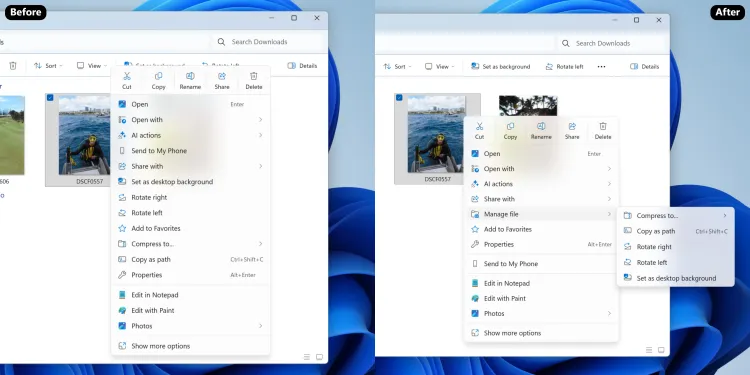
Additionally, cloud-related options, such as those related to cloud storage providers, are now neatly organized into their own cloud provider flyout. Features like Send to My Phone have also been moved to this section, streamlining the experience for users who regularly interact with cloud-based services.
Overall, these changes should help both fast and slower PCs benefit from a more streamlined and intuitive context menu, with easier access to the most frequently used actions.
Testing and Rollout
These improvements are currently available in the latest Windows 11 Dev Preview builds, with a full public rollout expected in early 2026. While they are still being tested, the changes are already receiving positive feedback for their ability to enhance both performance and usability, particularly for users with less powerful systems.
Microsoft’s ongoing commitment to refining the user experience in Windows 11 is evident in these updates, which aim to create a more efficient, responsive, and user-friendly operating system for everyone.
As with all Windows updates, users can expect further enhancements and adjustments in future builds, making it clear that Microsoft is actively listening to user feedback and working to optimize its operating system for all devices.