
Google Workspace Intelligence Revealed: 7 Powerful AI Upgrades
Google has officially unveiled Google Workspace Intelligence, a major leap forward in artificial intelligence integration across its productivity ecosystem. Announced at Google Cloud Next 2026, this innovation promises to reshape how users interact with apps like Gmail, Docs, Drive, and Meet by delivering deeply personalized, context-aware assistance.
The move signals a clear direction: Google is no longer just adding AI features—it is embedding intelligence into the very fabric of its workplace tools. As competition in enterprise AI intensifies, Workspace Intelligence could become a defining shift in how modern teams collaborate.
What Is Google Workspace Intelligence?
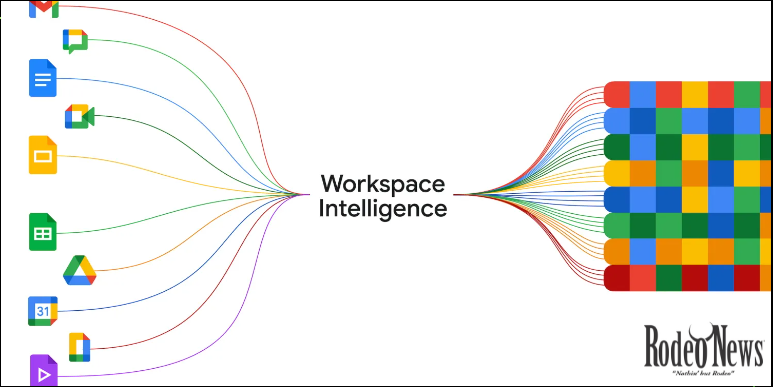
At its core, Google Workspace Intelligence is designed to provide “highly accurate, personalized context for every app.”
In simple terms, this means Google’s AI—powered by its Gemini models—can understand not just what you’re doing in one app, but how your entire workflow connects across multiple tools.
For example, instead of manually switching between emails, documents, and spreadsheets, Workspace Intelligence can:
- Analyze conversations in Gmail
- Pull relevant files from Drive
- Suggest edits in Docs
- Generate summaries or action items
All of this happens seamlessly, reducing the friction that typically slows down productivity.
1. Unified AI Context Across All Apps
One of the most powerful aspects of Google Workspace Intelligence is its ability to unify context across apps.
Previously, AI tools operated in silos—Gmail had Smart Reply, Docs had writing suggestions, and Meet had transcription features. Now, everything is interconnected.
This means:
- Emails can influence document suggestions
- Meeting notes can auto-populate tasks
- Files are surfaced based on real-time needs
This interconnected intelligence is similar to Google’s broader push toward “Personal Intelligence,” where AI connects data across services to create a personalized experience.
2. Deep Personalization for Every User
Another standout feature is personalization.
Workspace Intelligence doesn’t just process data—it learns how you work. Over time, it adapts to:
- Your writing style
- Your frequently used files
- Your communication patterns
- Your team’s workflow habits
This allows the AI to deliver suggestions that feel tailored rather than generic.
For instance, it can draft emails in your tone or recommend documents you’re likely to need before you even search for them.
3. Seamless Integration with Gemini AI
Google’s Gemini AI plays a central role in powering Workspace Intelligence.
Gemini has already been integrated across Workspace to assist with writing, summarization, and automation.
With this new upgrade, Gemini evolves from a helper into a proactive collaborator.
Instead of waiting for commands, it can:
- Anticipate tasks
- Offer proactive suggestions
- Automate repetitive workflows
This shift marks the transition from reactive AI tools to agent-like systems that actively participate in your work.
4. Smarter Collaboration Across Teams
Collaboration is at the heart of Google Workspace, and Intelligence takes it to the next level.
Teams can now benefit from:
- Shared AI context across members
- Real-time collaboration insights
- Automatic meeting summaries and action points
For example, after a Google Meet call, Workspace Intelligence can instantly generate:
- Key takeaways
- Task assignments
- Follow-up emails
This reduces the need for manual note-taking and ensures everyone stays aligned.
5. Automation Through AI Agents
A major theme at Cloud Next 2026 is the rise of AI agents—systems capable of executing tasks autonomously.
Workspace Intelligence taps into this trend by enabling automation such as:
- Scheduling meetings
- Organizing files
- Drafting reports
- Managing workflows
According to industry trends, agentic AI is becoming a key driver of productivity, allowing businesses to automate complex processes with minimal human input.
This positions Google Workspace as a platform not just for collaboration, but for intelligent task execution.
6. Enhanced Productivity and Efficiency
Google is betting big on AI to improve workplace efficiency.
At Cloud Next 2026, the company highlighted how its AI infrastructure is scaling rapidly to support billions of operations and enterprise workloads.
With Workspace Intelligence, users can expect:
- Faster task completion
- Reduced manual effort
- Better decision-making through insights
In practical terms, this could mean finishing a report in minutes instead of hours or automatically generating project updates without manual input.
7. A Competitive Edge in Enterprise AI
The launch of Google Workspace Intelligence is not happening in isolation—it’s part of a broader battle in the AI productivity space.
Microsoft, OpenAI, and other tech giants are also pushing AI-powered workplace tools. However, Google’s advantage lies in its ecosystem:
- Billions of users across Gmail, Drive, and Docs
- Deep integration of AI across services
- Advanced infrastructure like Tensor Processing Units (TPUs)
By embedding intelligence directly into widely used tools, Google lowers the barrier to AI adoption for businesses.
How This Changes the Future of Work
The introduction of Workspace Intelligence signals a shift toward AI-first productivity.
Instead of tools that require constant input, we are moving toward systems that:
- Understand context
- Predict needs
- Execute tasks
This transformation could redefine roles across industries, enabling workers to focus more on strategy and creativity while AI handles repetitive tasks.
Potential Challenges and Concerns
Despite its promise, Workspace Intelligence also raises important questions:
Data Privacy
With AI analyzing cross-app data, users may worry about how their information is used and protected.
Over-Reliance on AI
As automation increases, there’s a risk of becoming too dependent on AI systems.
Learning Curve
Organizations may need time to adapt workflows and fully leverage these new capabilities.
Google will need to address these concerns to ensure widespread adoption.
The Bigger Picture: Google’s AI Vision
Workspace Intelligence is just one piece of Google’s larger AI strategy.
From Search to Cloud to Workspace, the company is building an ecosystem where AI is seamlessly integrated into every experience.
This aligns with its broader goal of creating tools that are not just functional, but intelligent and adaptive.
Conclusion
The launch of Google Workspace Intelligence marks a significant milestone in the evolution of workplace technology.
By delivering personalized, context-aware AI across its apps, Google is transforming how people work, collaborate, and stay productive.
With features like unified context, deep personalization, AI agents, and seamless automation, Workspace Intelligence is more than just an upgrade—it’s a glimpse into the future of work.
As businesses continue to embrace AI, tools like this will play a crucial role in shaping a smarter, faster, and more efficient digital workplace.