
Pixel Voice Broadcast Gets a Major Android 17 Boost
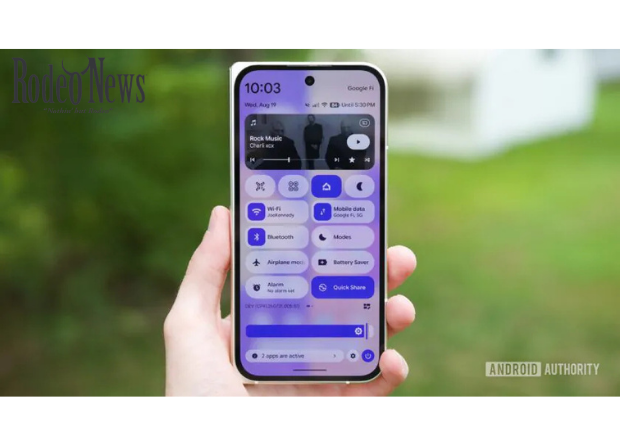
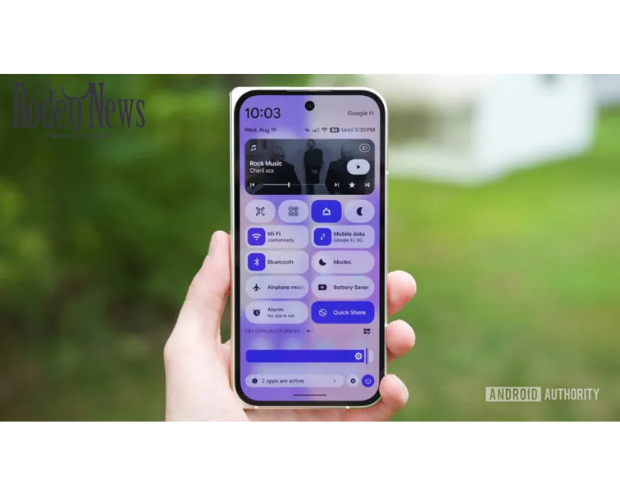
Google is making Pixel Voice Broadcast significantly easier to use with Android 17 QPR2 Beta 4. The latest beta removes one of the biggest barriers to the feature by allowing Pixel owners to access Voice Broadcast directly through Quick Settings instead of digging through developer options.
The feature is part of Google’s expanding support for Auracast, a Bluetooth technology designed to let a single audio source broadcast sound to multiple compatible receivers. While Pixel phones have supported Auracast-based media sharing, Google’s newer implementation also allows users to broadcast their own voice over a private audio channel. AAndroid Authority
The change may look small, but it could make the feature considerably more practical.
Instead of being something hidden away for beta testers and enthusiasts, Pixel Voice Broadcast is becoming a feature that users can activate with a simple tap.
What Is Pixel Voice Broadcast?
Pixel Voice Broadcast essentially turns a compatible Pixel phone into a small wireless public-address system.
The feature allows a user to transmit their voice over a private Bluetooth LE Audio broadcast channel. People with compatible earbuds or other supported audio devices can then listen to the broadcast without the speaker needing to physically hand over a microphone or connect every device individually.
This is based on Auracast, a Bluetooth LE Audio capability designed for one-to-many audio broadcasting.
Auracast has applications beyond smartphones. The technology can potentially be used in public venues, classrooms, airports, theaters, accessibility systems and other environments where multiple people need to listen to the same audio source.
Google has already used Auracast capabilities on Pixel devices for media sharing. However, the ability to broadcast a user’s own voice represents a more interesting extension of the technology.
With Android 17 QPR2 Beta 4, Google is making that capability easier to discover and activate. AAndroid Authority
Android 17 QPR2 Beta 4 Makes Voice Broadcast Easier
The biggest improvement in the latest beta is accessibility.
Earlier versions of the feature required users to enable it through Developer Settings. That made Pixel Voice Broadcast difficult for ordinary users to find, even if their device supported the underlying technology.
Android 17 QPR2 Beta 4 changes that.
Users can now add a dedicated Voice Broadcast tile to Quick Settings and launch the feature directly. Bluetooth must still be enabled, but there is no longer the same need to manually unlock the functionality through developer-oriented menus. AAndroid Authority
That distinction matters.
Google has increasingly moved experimental Android features from hidden settings toward standard system interfaces once they become mature enough for broader testing. The Quick Settings integration suggests Voice Broadcast could be heading in that direction.
It does not necessarily mean every Pixel user will receive the feature immediately. The functionality is currently being tested as part of Android 17 QPR2.
[Internal Link: Latest Google Pixel news and updates]
How Pixel Voice Broadcast Works
The technology behind Pixel Voice Broadcast is based on Bluetooth LE Audio rather than conventional Bluetooth audio connections.
Traditional Bluetooth audio is generally designed around a direct connection between a source and one or a limited number of receivers. Auracast takes a different approach.
Instead of establishing an individual audio connection with every listener, a compatible source can transmit an audio broadcast that supported devices can join.
For Voice Broadcast, the Pixel phone acts as the source.
The user’s voice is transmitted through the broadcast channel, while compatible earbuds or other Bluetooth LE Audio devices receive it.
This could be particularly useful in situations where several people need to hear the same person.
For example, a guide could speak to a group without raising their voice. A teacher could potentially broadcast instructions to students wearing compatible earbuds. A presenter could use the feature as a lightweight wireless microphone system.
The technology could also have accessibility applications.
A Private Broadcast Network
One of the more interesting aspects of Google’s implementation is the ability to control who can listen.
According to Android Authority, users can protect their listening session with a password. They can also choose to broadcast publicly. AAndroid Authority
That gives Voice Broadcast two very different use cases.
A public broadcast could be useful when a user wants anyone with compatible equipment nearby to hear the transmission.
A password-protected broadcast, meanwhile, provides more control over the audience.
That could make the feature more appropriate for private meetings, classrooms, small events or other situations where the speaker does not want an unrestricted audience.
The password mechanism also addresses an obvious concern with wireless broadcasting: unwanted listeners.
While the exact implementation may evolve before the feature reaches a stable release, the presence of access controls indicates that Google is considering more than just the technical ability to broadcast audio.
Pixel Voice Broadcast Wasn’t Actually New
Despite its appearance in Android 17 QPR2 Beta 4, Pixel Voice Broadcast is not technically a brand-new feature.
Google introduced the underlying voice-broadcast capability in an earlier Android 17 QPR2 beta.
In QPR2 Beta 2, the feature was reportedly referred to as “Voicecast.” However, it was not readily accessible to normal users and had to be enabled through Developer Settings. AAndroid Authority
The latest beta therefore represents more of a usability upgrade than the introduction of an entirely new technology.
That may actually be more significant.
A feature can exist technically for months without becoming useful to mainstream customers if it is difficult to discover. Moving Voice Broadcast into Quick Settings makes it much more visible.
Google is effectively turning a hidden experiment into something that looks and behaves more like a normal Android feature.
Why Auracast Could Matter for Pixel Users
Auracast has the potential to change how people think about wireless audio.
Most smartphone owners are familiar with Bluetooth earbuds. They connect their headphones to a phone and listen privately.
Auracast expands that concept.
Instead of one person listening privately, one source can broadcast audio to multiple compatible devices.
Imagine a museum where visitors can listen to an exhibit’s narration through their own earbuds. Consider an airport broadcasting an announcement directly to compatible hearing devices. Or picture a conference where attendees can listen to a speaker without needing a traditional PA system.
Those are some of the broader applications Bluetooth SIG has promoted for Auracast.
Google’s work on Pixel Voice Broadcast demonstrates how the same technology can be used directly from a smartphone.
[Internal Link: Everything you need to know about Bluetooth LE Audio]
Samsung Already Offers a Similar Feature
Google is not alone in exploring this technology.
Samsung has offered a similar capability called Audio Broadcast. It also uses Auracast technology to allow compatible devices to listen to an audio stream from a single source.
That gives Pixel Voice Broadcast an interesting competitive angle.
Google’s implementation could help Pixel phones catch up with Samsung’s broader use of Auracast, while simultaneously integrating the technology into Android’s standard audio ecosystem.
The competition could ultimately benefit users.
As more manufacturers support Auracast, compatible headphones, earbuds and hearing devices could become increasingly common. That would make broadcast audio more useful because consumers would not need specialized equipment for every individual use case.
Which Pixel Phones Support Android 17 QPR2 Beta 4?
Android 17 QPR2 Beta 4 is being distributed to a range of Pixel devices enrolled in Google’s beta program.
Reports indicate that the supported lineup includes devices beginning with the Pixel 6a, along with newer Pixel phones and Pixel Tablet. The Pixel 6 and Pixel 6 Pro are no longer supported for QPR2. AAndroid Authority+1
The beta builds vary depending on the hardware generation.
Google’s beta program is intended for testing rather than ordinary users who require maximum stability. Anyone installing beta software should therefore expect potential bugs and compatibility problems.
For Pixel owners who are simply interested in Voice Broadcast, waiting for a stable release may be the safer choice.
How to Add Pixel Voice Broadcast to Quick Settings
If the feature is available on a supported device running Android 17 QPR2 Beta 4, the new Quick Settings integration makes access considerably easier.
The general process is straightforward:
- Open the Quick Settings panel on your Pixel.
- Select the option to edit or rearrange Quick Settings.
- Look for the Voice Broadcast tile.
- Add it to your active Quick Settings.
- Tap the tile when you want to start broadcasting.
- Make sure Bluetooth is enabled.
- Configure the broadcast and listening access as required.
The exact interface may change as Google continues testing Android 17 QPR2.
Because this is beta software, users should not assume that every menu or option shown in current test builds will remain identical in the final release.
The Feature Could Be More Useful Than It Looks
At first glance, Voice Broadcast may seem like a niche addition.
Most people do not need to turn their smartphone into a wireless PA system every day.
But Google’s history with Android shows that small system-level features can become surprisingly useful once compatible hardware becomes widespread.
The key is the ecosystem.
If more earbuds, hearing aids, headphones and other audio products support Bluetooth LE Audio and Auracast, the usefulness of Pixel Voice Broadcast could increase dramatically.
A feature that initially appeals to enthusiasts could eventually become an everyday accessibility and communication tool.
That is especially important because the phone itself does not necessarily need to be paired individually with every receiver.
The broadcast model is what gives Auracast its potential.
Android 17 QPR2 Is Building Toward a Bigger Pixel Update
Voice Broadcast is only one of several changes being tested in Android 17 QPR2 Beta 4.
The latest beta primarily focuses on fixes and usability improvements, but testers have also identified additional changes that were not highlighted in Google’s main changelog. These include the new Voice Broadcast Quick Settings tile, changes to notification intelligence, wallpaper and style updates, and other interface adjustments. 99to5Google
Google is continuing to refine Android 17 through its quarterly platform release cycle.
That means features appearing in QPR2 betas should not necessarily be viewed as isolated experiments. Some could become part of a larger Pixel feature update later in the year.
For Pixel owners, that makes QPR2 worth watching even if the current builds are primarily intended for testers.
[Internal Link: Android 17 features and Pixel update guide]
When Will Pixel Voice Broadcast Reach Everyone?
Google has not yet provided a definitive public release date for the broader rollout of Voice Broadcast.
Android Authority notes that there is currently no clear confirmation of when the feature will reach a wider range of Pixel devices. AAndroid Authority
The presence of the Quick Settings tile is encouraging, but it should not be treated as a guarantee of immediate stable availability.
Google can still change, delay or remove features during beta testing.
The final implementation could also depend on device compatibility, Bluetooth LE Audio support and the availability of compatible receiving devices.
For now, Pixel users interested in testing the feature will need compatible hardware and an eligible Android 17 QPR2 beta build.
A Small Pixel Feature With Big Potential
The biggest story behind Pixel Voice Broadcast is not simply that Google has added another Quick Settings button.
It is that Google is making Auracast-based communication easier to use.
The underlying technology has the potential to change how smartphones interact with groups of audio devices. By allowing a Pixel phone to become a broadcast source, Google is showing one practical way that Bluetooth LE Audio can move beyond traditional one-to-one headphone connections.
Android 17 QPR2 Beta 4 takes an important step by making Voice Broadcast easier to discover.
Previously, users had to venture into Developer Settings to access the feature. Now, a Quick Settings tile can put it only a tap away.
That may seem like a minor interface change, but it could be exactly what the feature needs.
If Google continues refining Voice Broadcast and Auracast support, Pixel phones could eventually become much more capable tools for group communication, accessibility and shared listening.
For now, Pixel Voice Broadcast remains a beta feature. But Android 17 QPR2 Beta 4 suggests Google is no longer treating it as something that needs to stay hidden.
And that could be the first sign that Auracast is about to become a much bigger part of the Pixel experience.