
Apple Obsolete Products: 3 Devices Lose Support
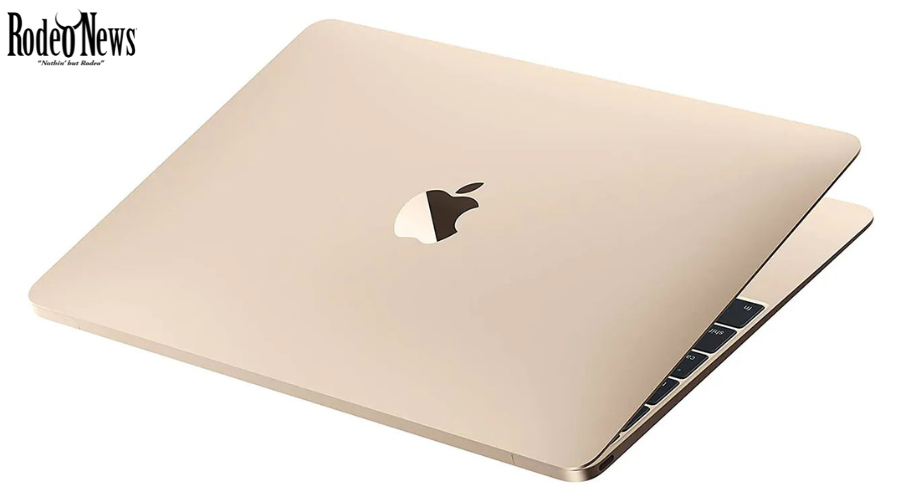
Apple has added three more devices to its obsolete products list, ending standard hardware service eligibility for several products that once had dedicated users. The latest update affects the 2017 12-inch MacBook, the sixth-generation iPad and BeatsX wireless headphones, according to reports published on October 14, 2026.
The Apple obsolete products update is especially notable for owners of the compact MacBook. The model was the final version of Apple’s 12-inch Retina MacBook line, which developed a loyal following among users who valued portability and a lightweight design.
The addition of the sixth-generation iPad and BeatsX headphones also highlights how the company’s support policies evolve as older hardware moves further beyond its original release period.
However, the obsolete classification does not mean that these devices will suddenly stop working. Owners may still be able to use functioning products for everyday tasks. The main change concerns official hardware repairs, replacement parts and servicing through Apple and its authorized service providers.
Understanding the distinction can help owners decide whether to continue using their existing devices, explore independent repair options or consider an upgrade.
Apple Obsolete Products: Which 3 Devices Are Affected?
Apple regularly updates its public list of vintage and obsolete products based on how long ago a device stopped being distributed for sale.
The October 14 update added three products to the obsolete category.
1. The 2017 12-inch MacBook
The most prominent addition is the MacBook (Retina, 12-inch, 2017). This was the final model in Apple’s compact 12-inch MacBook lineup before the company discontinued the product family.
The laptop was designed around portability. Its thin construction, lightweight body and 12-inch Retina display made it attractive to students, travelers and professionals who wanted a computer that could fit easily into a small bag.
The design also involved compromises. The 2017 model used Intel hardware and offered a limited selection of ports, relying on USB-C for its main physical connection. It also featured Apple’s butterfly keyboard mechanism, which attracted criticism over reliability concerns across affected MacBook models.
Despite these limitations, the computer developed a dedicated fan base. Some users appreciated its compact dimensions and minimalist design, particularly compared with larger MacBook Air and MacBook Pro models.
Apple had already classified the 2015 and 2016 versions as obsolete. With the 2017 model now joining them, every generation of the 12-inch Retina MacBook has reached that status.
For owners, this means standard Apple hardware service is no longer available for the model. Authorized service providers generally cannot order replacement parts through Apple’s normal service channels.
There is, however, an important qualification for Mac laptops: Apple says certain MacBook models may remain eligible for battery-only service for up to 10 years after distribution ended, depending on parts availability and applicable requirements. Owners should check directly with Apple rather than assume that a battery replacement is either guaranteed or impossible.
2. The Sixth-Generation iPad
The second addition is the sixth-generation iPad, including both Wi-Fi and Wi-Fi + Cellular versions.
Introduced in 2018, the tablet was designed as an accessible option for everyday computing. It supported common activities such as web browsing, reading, video streaming, online learning and video calls.
Its relatively straightforward design and broad range of uses made it popular with families, students and casual tablet users.
The move to obsolete status does not automatically make a sixth-generation iPad unusable. A working tablet can continue to power on, access locally stored files and run applications compatible with its installed software.
The concern is what happens when a component fails. A damaged screen, deteriorating battery or charging problem may become harder to resolve if official replacement parts are no longer available.
Software support is another issue. An application may eventually require a newer operating system than the tablet can run. That limitation is separate from the hardware classification and depends on the application’s requirements and the software version installed.
Owners should therefore evaluate both the physical condition of their tablets and their ability to run the applications they need.
3. BeatsX Wireless Headphones
The third addition covers BeatsX wireless headphones in several color options, including Burned Red, Defiant Black-Red, Deep Black, Pure White and Sky Blue.
BeatsX arrived during a period when wireless listening was becoming increasingly popular. Its neckband-style design differed from fully wireless earbuds, with the two earpieces connected by a cable worn around the neck.
The headphones appealed to listeners who wanted a compact audio accessory for commuting, exercise and everyday use.
For owners whose headphones still function properly, the obsolete designation may have little immediate effect. They can continue using the device as long as its battery, charging system and other components work.
Problems arise when hardware begins to fail. Battery deterioration, charging issues and damaged components may be more difficult to address through official service channels.
Independent repair providers may offer alternatives, but parts availability and repair feasibility can vary. Owners should confirm the options before paying for a repair.
What Does Apple’s Obsolete Classification Mean?
Apple separates older products into vintage and obsolete categories. These classifications help customers understand whether a device may still qualify for official hardware service.
According to Apple’s published support policy, a product is generally considered vintage after more than five years but fewer than seven years have passed since Apple stopped distributing it for sale.
A product is generally classified as obsolete after Apple stopped distributing it for sale more than seven years ago.
These timelines are based on distribution ending, rather than simply counting years from a product’s announcement or launch.
Vintage products may still receive service
Apple and its authorized service providers may continue to offer repairs for vintage products, depending on parts availability and applicable legal requirements.
This means vintage status does not automatically eliminate every repair option. However, customers should not assume that all components remain available.
Availability may vary by model, region and type of repair. Confirming service options before making a decision is particularly important when a device is already several years old.
Obsolete products generally lose official hardware service
Once a product is classified as obsolete, Apple discontinues standard hardware service for it. Authorized service providers generally cannot order the parts required through Apple’s regular service system.
This can make repairs more difficult, especially when a device requires specialized components that are no longer widely stocked.
Mac laptops have a potential exception for battery-only service, which may remain available for up to 10 years after distribution ends, subject to parts availability and Apple’s applicable requirements.
For details, owners can consult Apple’s official service policy.
Will These Apple Devices Stop Working?
No. Obsolete status is a hardware service classification, not an automatic shutdown mechanism.
A functioning 2017 MacBook can still boot and perform tasks supported by its software. A sixth-generation iPad can continue handling compatible applications, while working BeatsX headphones can still play audio.
Nevertheless, long-term usefulness depends on several factors.
Battery health, physical condition, operating-system compatibility and security support all affect whether an older product remains practical. These issues should be considered separately from Apple’s repair classification.
For example, a MacBook may still be suitable for writing documents, managing files and browsing websites. But a serious hardware failure could become expensive or difficult to fix.
An iPad might remain useful for reading and streaming, yet no longer support a newer version of an application required for work or school.
The most sensible decision depends on the device’s condition and the owner’s needs, not solely on the obsolete label.
What Owners Should Do After Apple’s Announcement
The update does not mean every affected customer needs to buy new hardware immediately. However, owners can take practical steps to prepare for possible failures and reduce the risk of losing important data.
Back up important files
MacBook and iPad owners should ensure that important documents, photographs and other files are backed up.
Depending on the device and existing setup, options include iCloud, external storage or another reliable backup service.
A backup becomes especially important when using older hardware because recovering files after a serious failure may be difficult.
Owners should also confirm that their backups are complete and accessible. A backup that has never been tested may not provide the protection they expect.
Check battery health and physical condition
Battery performance is a major consideration when deciding whether to keep an older device.
MacBook owners should watch for unusually short battery life, unexpected shutdowns and charging problems. iPad owners should similarly assess whether their tablets still hold enough charge for everyday use.
BeatsX owners can consider battery performance and charging reliability when deciding whether to continue using their headphones.
If a battery appears swollen or a device becomes unusually hot, stop using and charging it and seek professional guidance. Do not attempt to puncture or dismantle a lithium-ion battery.
Confirm repair costs before committing
Before arranging a repair, contact an appropriate service provider and explain the exact model and problem.
Ask whether the required parts are available, whether the repair can be completed safely and what the total cost will be.
Independent repair providers may offer alternatives to manufacturer service, but their parts, expertise and warranties can vary.
Compare the estimated repair cost with the price of a replacement device. A modest repair may be worthwhile if the product otherwise meets your needs. A costly repair may be harder to justify when the device is already limited by age or software compatibility.
Review software and security support
Owners should check which operating systems their devices support and whether the applications they use still receive updates.
People who rely on their devices for banking, work accounts or other sensitive activities should pay particular attention to security support.
A device may remain physically functional even after it becomes less suitable for certain online tasks. Keeping software current where possible and understanding its remaining limitations are important parts of responsible device ownership.
Why Apple’s Vintage and Obsolete Lists Matter
Apple’s classifications give customers a reference point for understanding the service life of their electronics.
Devices can remain functional for years, but access to specialized parts and manufacturer-supported repairs often becomes more limited as products age.
The latest additions illustrate the difference between a product’s lifespan and its repairability. A laptop may still handle everyday tasks, yet a failed component can become a significant obstacle when standard service is no longer offered.
This matters to customers who prefer to keep their electronics for as long as possible. Careful maintenance, reliable backups and realistic expectations about repair costs can help extend a device’s useful life.
The classifications also provide a reason to plan ahead. Owners who depend on an older computer for work, for example, may want to prepare a backup device or understand their replacement options before a hardware failure occurs.
Apple’s official lists cover products across multiple categories, including Mac, iPhone, iPad and Beats. Because the lists change over time, checking the latest official information is more reliable than estimating a device’s status based only on its release date.
Should You Replace Your MacBook, iPad or BeatsX?
The answer depends on the device’s condition, the software it supports and what you need it to do.
If a 2017 MacBook still performs well for basic tasks, there may be no immediate reason to replace it. Owners should maintain backups and understand that a serious hardware problem could be more difficult to resolve.
For sixth-generation iPad users, the main questions are whether the tablet supports their essential applications, whether its software remains suitable for their needs and whether its battery and display are in good condition.
BeatsX owners can continue using working headphones, but may want to explore replacements if battery performance declines or hardware problems emerge.
An upgrade becomes more compelling when a device no longer meets everyday requirements, essential applications are unsupported or repair costs outweigh the benefits of continued use.
There is no single replacement choice that suits every customer. Budget, preferred features, accessibility requirements and existing accessories all influence the decision.
The Bottom Line
Apple’s October 14, 2026, update adds the 2017 12-inch MacBook, sixth-generation iPad and BeatsX wireless headphones to its obsolete products list. The change generally ends standard official hardware servicing for these devices, although some Mac laptops may qualify for battery-only service for an extended period when parts remain available.
For owners, the announcement is a reason to plan ahead rather than panic. Backing up data, checking battery condition, reviewing software compatibility and confirming repair costs can help determine whether an older device remains worth keeping.
Obsolete status does not erase a device’s usefulness overnight. It does, however, make it more important to understand the limitations of future repairs and prepare for the possibility that replacement may eventually become the more practical option.